 Almaftuchin
 PDF Helper PDF To DOC
Brand:
Checking..
SKU:
Checking..
Version:
Checking...
Operating System:
Windows
License Type:
Serial Key
Delivery:
Screenshots:
Select License:
About PDF Helper PDF To DOC
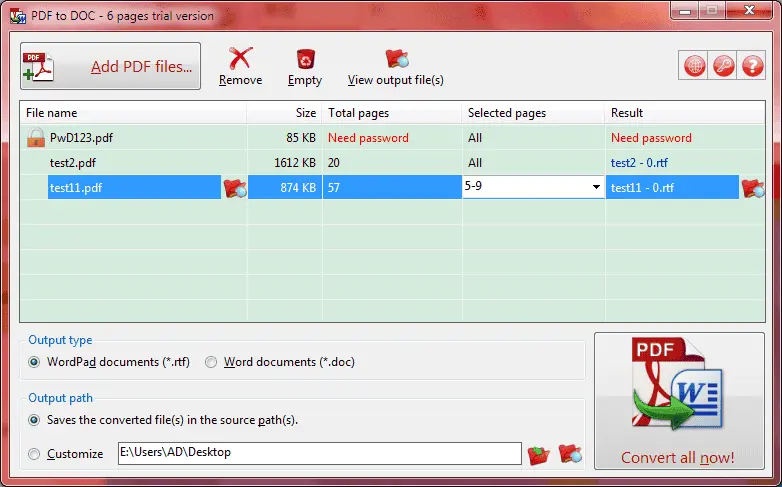
PDF Helper PDF To DOC is a dedicated PDF converter software for Windows that converts PDF files into Microsoft Word documents (both .doc and .rtf formats). It is developed for offline use, meaning it does not require an internet connection to perform conversions.
Key Features:
- Accurate Conversion: PDF Helper PDF To DOC preserves the original layout, text formatting, images, and other elements of the PDF document when converting it to Word format.
- Multiple PDF Version Support: The software supports various versions of PDF files, including PDF 1.7, enabling it to handle more complex documents.
- Output Quality Settings: Users can adjust the output quality of the Word document according to their needs, whether for professional or personal use.
- User-Friendly Interface: PDF Helper PDF To DOC features an intuitive interface, making it easy for users to navigate and utilize conversion features.
- Batch Conversion: The software supports batch conversion, allowing users to convert multiple PDF files simultaneously, thereby saving time and effort.
- Data Security: Because it operates offline, PDF Helper PDF To DOC ensures that user data remains secure and is not exposed to online security risks.
- Windows Support: PDF Helper PDF To DOC is compatible with various versions of Windows, including Windows 10, 8, and 7.
How to Activate PDF Helper PDF To DOC
-
Download Installer
Download and install PDF Helper PDF To DOC.
- Open Program
- Click the Key icon 🗝️
- Select "Input license key"
- Enter License Code
- Enter Your Name twice
- Click OK
- Restart Program
- Done
Frequently Asked Questions
How long does the delivery process take?
Delivery will be processed immediately after payment is verified and during our store's working hours.
Can it be installed on Android, Mac, and iOS?
No, PDF Helper PDF To DOC only supports installation on Windows.
Do you provide a usage tutorial?
No, we do not provide a usage tutorial. Please visit the official website or search on Google for more information.
What if I need installation assistance?
Our admin is ready to help you via WhatsApp or email.
How long is the product warranty period?
This product comes with a 30-day warranty.
Is there a money-back guarantee?
Yes, we offer a 100% money-back guarantee if the product does not match what we sell. (Please read the Warranty Terms and Conditions for more details.)